License Activation
Wisej.NET is licensed per developer and per server, and the two kinds of license are activated in different places: a Developer license in the Visual Studio designer, on one machine; a Server license in the application's Web.config, on each server that runs Wisej.NET applications. This page covers both activations. The licenses themselves — editions, prices and terms — are described in the License section.
- Developer — one license for each developer using Wisej.NET, activated in the designer on one machine. The editions are the free Community edition, Professional and Enterprise; see Developer Licenses.
- Server — one license for each server running Wisej.NET applications, entered in
Web.config. The edition sets how many server instances one key activates; the free Express edition replaced the earlier Server Community edition. See Server Licenses. - Trial — an evaluation key that can be used for both developer and server activations. Request one with Start Trial in the activation dialog below.
- Hybrid — licenses for Wisej.NET Hybrid apps, activated in the Hybrid client project rather than here. See Hybrid Licenses and the Hybrid manual's License Activation.
Developer License
The first time you open a page or a window in the designer, Wisej.NET asks for a Developer or Trial license key:
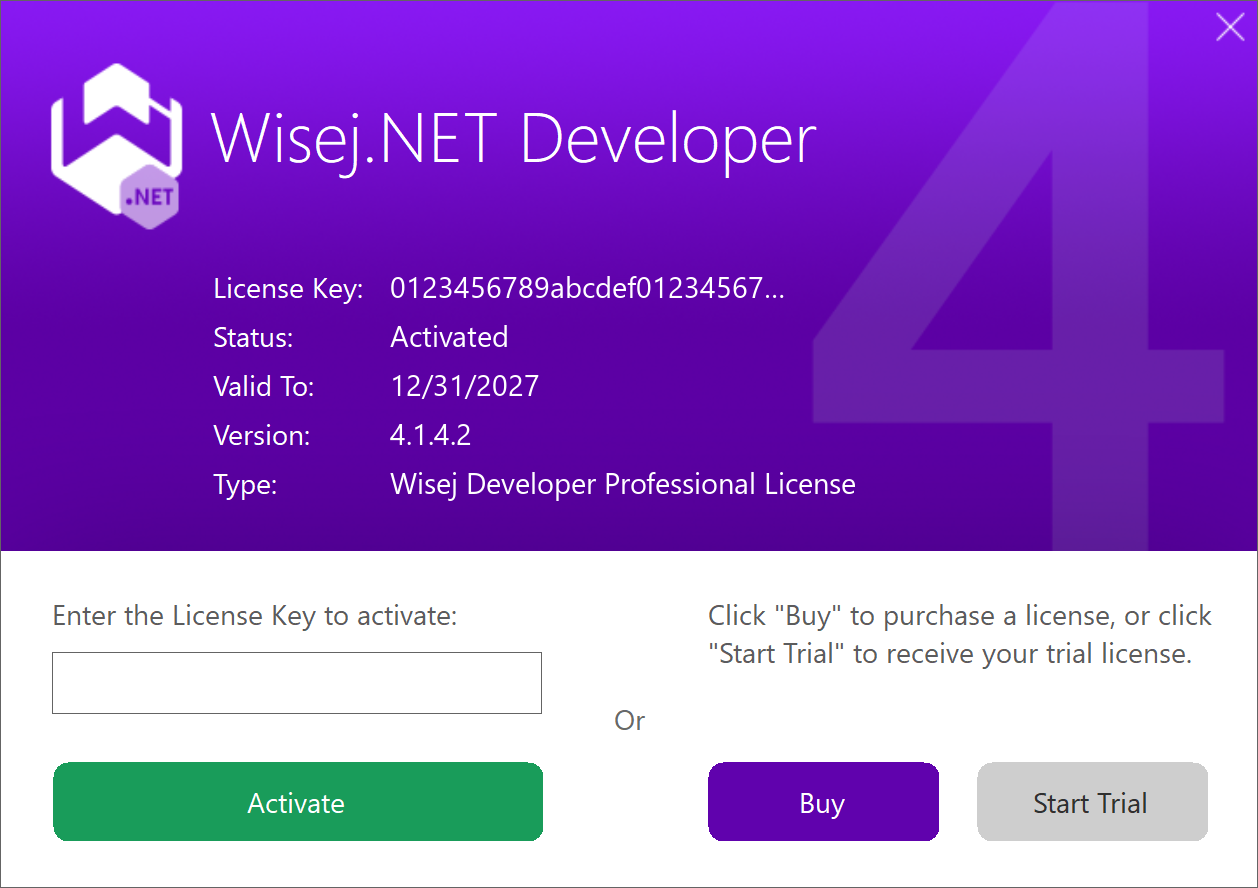
Enter the key and click Activate. Activation needs an internet connection: the designer contacts the Wisej.NET license server, and once it has answered the panel shows the license key, its status, the date it is valid to, the Wisej.NET version it covers and the license type. If you have no key yet, Buy opens the online shop and Start Trial requests a trial key.
Each Developer license is activated on one machine. A second machine needs a license of its own — or the free Community edition, where its terms allow it. The Licensing FAQ has the details, including build servers.
Changing a Developer License
To replace a Trial key with a Developer key, click the Wisej.NET icon at the right end of the toolbar at the bottom of the designer. It opens the License Panel, which shows the current key, its status, the date it is valid to, the version it covers and the license type; enter the new key and click Activate. A Developer license can be activated on one machine at a time — see the licensing FAQ — so to move it to a new machine, remove Wisej.NET from the old one first.
Server License
A server is activated from the application's configuration rather than interactively. Enter the Server or Trial license key in Web.config, under appSettings, as the Wisej.LicenseKey setting described in Configuration:
<appSettings>
  <add key="Wisej.LicenseKey" value="your-server-license-key" />
</appSettings>
Wisej.NET activates the license the first time the application loads, and again whenever the key changes, so you can replace it at any time. The activation is stored in a wisej-server.lic file, written to the application's folder and to C:\ProgramData\IceTeaGroup\Wisej; the account the application runs under needs write permission to the application's folder or to C:\ProgramData, or the activation fails.
On IIS, the application runs under the identity of its application pool. When you create a new application pool or change the identity of an existing one, make sure that account can write to the application's folder or to C:\ProgramData. The default ApplicationPoolIdentity is a member of the IIS_IUSRS group, so granting that group write access to the application's folder is usually enough.
The server has to be connected to the internet to activate; offline activation is available on the Advanced and Data Center editions only. One key activates as many server instances as its edition allows — see Activations — and an activation beyond that limit fails. If the activation does not go through, see License Activation in the Deployment manual.
License Renewal
Wisej.NET licenses are subscriptions: a subscription lasts twelve months and covers every release of Wisej.NET published while it is active, and the license stays valid forever for those releases after it expires. Renewing extends the upgrade period; see Subscription and Renewals.
Wisej.NET detects when a license has expired and the application is using a newer build than the one it was activated for. When that happens, the license manager downloads the renewed license by itself, provided you have renewed the subscription on wisej.com. Nothing else is needed: you do not register again, and the key in Web.config stays the same.
License Troubleshooting
The problems we are asked about most often. For a server whose activation fails, or whose wisej-server.lic file has been corrupted, see also License Activation in the Deployment manual.
An old Server Community license stopped working
The Wisej.NET Server Community edition has been discontinued and replaced by the free Server Express edition. Get an Express license from the online shop — the checkout is free — and put its key in Web.config in place of the old one.
"Invalid Server License" with a Server Express key
The Server Express license requires Wisej.NET 3.5.6.9 or later; an earlier version reports it as invalid. Update the Wisej.NET NuGet package in the project to 3.5.6.9 or later — the current release is 4.1 — and, on the development machines, the Wisej.NET for Visual Studio extension from wisej.com/builds. Rebuild and redeploy.
Where to see the licenses you own
Sign in on wisej.com, click Support in the upper-right corner and select Account. The account page lists your licenses and their keys.
"WrongProductName"
The key in Web.config is a Developer key. A server is activated with a Server or Trial key; the Developer key belongs in the designer only.
Everything is set up correctly and the application still reports "Invalid License"
Rebuild the project and deploy the new build. If the error stays, check the server's activation as described in the Deployment manual.