Fluent Themes and Icons
Introduction
This release introduces a cohesive set of Fluent Design–based visual assets, including updated themes and icon packs aligned with the Microsoft Fluent Design System. Together, these additions provide a consistent and modern UI layer for Wisej.NET applications, combining structured layouts, refined color systems, and standardized iconography.
The Fluent themes and icons are designed to work seamlessly within the Wisej.NET theming infrastructure, ensuring visual consistency across components while maintaining flexibility for customization. With support for both light and dark variants, as well as filled and outlined icon styles, developers can implement adaptive interfaces that align with user preferences, accessibility requirements, and contemporary design standards.
Themes
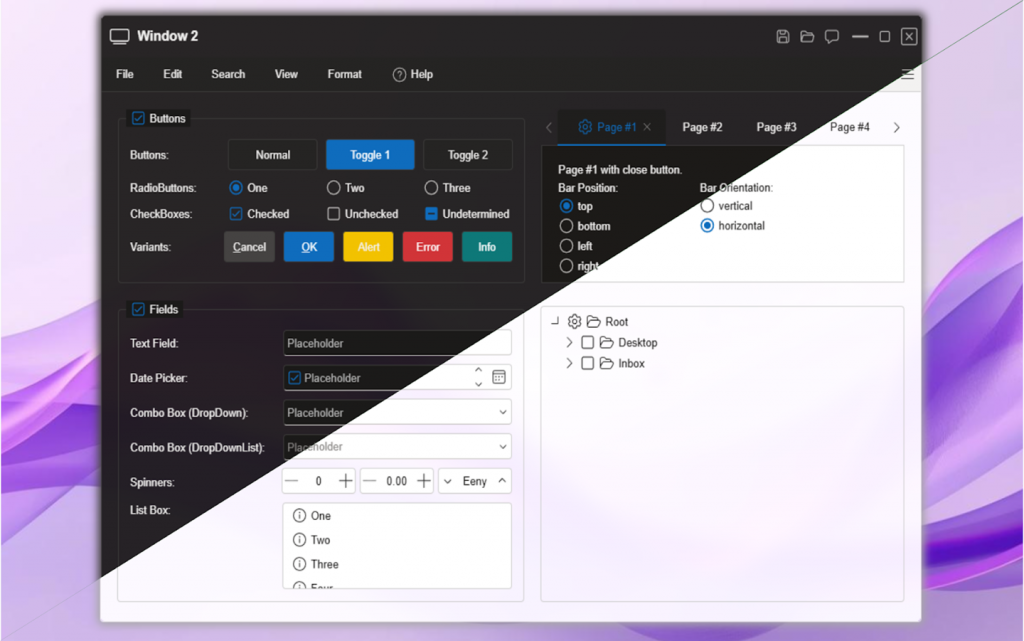
Wisej.NET 4.1 extends the theming system with four new built-in themes: FluentLight-5, FluentDark-5, Material-4, and MaterialDark-4. These additions provide modern, design-system-aligned styling options with improved consistency, readability, and accessibility across Wisej.NET applications. Like the other built-in themes, they are embedded in Wisej.Framework and selected with the Wisej.DefaultTheme setting or Application.LoadTheme().
Technical Highlights
- Multiple Design Systems
- FluentUI Light / Dark: Based on the Microsoft Fluent Design System, offering clean layouts, balanced spacing, and refined color schemes.
- Material / Material Dark: Inspired by Material Design principles, focusing on structured layouts, depth, and visual hierarchy.
- Light & Dark Variants
Each design system includes light and dark modes optimized for different lighting conditions and user preferences, with consistent contrast and accessibility considerations. - Native Theming Engine Integration
All themes are delivered as standard Wisej.NET theme definitions and integrate seamlessly with the existing theming infrastructure. - Runtime Theme Switching
Supports dynamic switching between themes at runtime, enabling user-driven customization or system-based theme adaptation. - Customization & Extensibility
Themes can be extended using the Wisej.NET Theme Builder or JSON mixins to adjust colors, typography, and component styling. - Cross-Platform Consistency
Ensures uniform rendering and behavior across supported browsers and devices.
These themes expand the visual capabilities of Wisej.NET, enabling developers to align applications with modern UI standards while maintaining full control over customization.
Live Demo
Explore a sample application using a Fluent theme: https://demo.wisej.net/AppointmentPlanner
Icon Packs
This release adds two icon libraries: FluentUI Filled Icons and FluentUI Outlined Icons, providing a comprehensive set of modern, Fluent Design–aligned icons for Wisej.NET applications. Like the other icon packs, each is a NuGet package whose icons appear in the designer's image picker and are served through resource.wx.
The new FluentUI Icon Packs introduce an updated SVG renderer which, when integrated into an application, overrides the default Wisej.NET rendering pipeline and takes full control of SVG rendering across the entire application. Check any custom SVG icons after adding one of these packs.
Technical Highlights
- Dual Icon Styles
- Filled Icons: Optimized for emphasis and high-visibility UI elements.
- Outlined Icons: Lightweight, minimal style suited for clean and less dense interfaces.
- Design Consistency
Icons follow the visual language of the Microsoft Fluent Design System, ensuring seamless integration with FluentUI themes. - Scalable Vector Assets
Delivered as vector-based resources, ensuring sharp rendering across resolutions and DPI settings. - Seamless Integration
Fully compatible with Wisej.NET controls and theming, enabling straightforward usage across components. - Flexible Usage
Suitable for toolbars, navigation, dashboards, and custom UI elements, with consistent styling across the application.
These icon packs enhance visual consistency and provide developers with a modern, standardized iconography set aligned with FluentUI-based interfaces.
Live Demo
Browse the FluentUI icons here https://demo.wisej.net/#Icon%20Packs/FluentUI%20Outlined/Features and here https://demo.wisej.net/#Icon%20Packs/FluentUI%20Filled/Features