Use platform-specific network features
This section is relevant for building Wisej.NET Hybrid local applications that are running locally on the device. Wisej.NET Hybrid remote applications cannot directly interact with platform-specific features except through a bridge.
The HttpClient class provides an abstraction of the connection to the network. An app that uses this class is independent of the native platform networking stack. The Wisej.NET Hybrid (.NET MAUI) templates map the HttpClient class to code that utilizes the native networking stack of each platform. This enables an application to take advantage of platform-specific network configuration and optimization features. This is especially important when you need to configure a client application to connect securely to a REST web service.
Configure App Transport Security on iOS
App Transport Security (ATS) is an iOS feature that requires every network communication done through the native HTTP network stack to use TLS 1.2 or above. Modern encryption algorithms won't disclose information if one of the long-term keys is compromised.
If your app doesn't adhere to these rules, it will be denied network access. To fix this problem, you have two options; you can change your endpoint to adhere to the App Transport Security policy or you can opt out of App Transport Security.
To opt out of App Transport Security, add a new key called NSAppTransportSecurity to the Info.plist file. You'll find the Info.plist file in the iOS folder in project's the Platforms folder in Solution Explorer. This key is actually a dictionary. Add another key called NSExceptionDomains to this dictionary. This key contains a child for each of the endpoints you want to target. Each endpoint can have its own configuration, specifying which features to allow or disallow. You can add this key either using the generic plist editor in Visual Studio, or by opening it as an XML file.
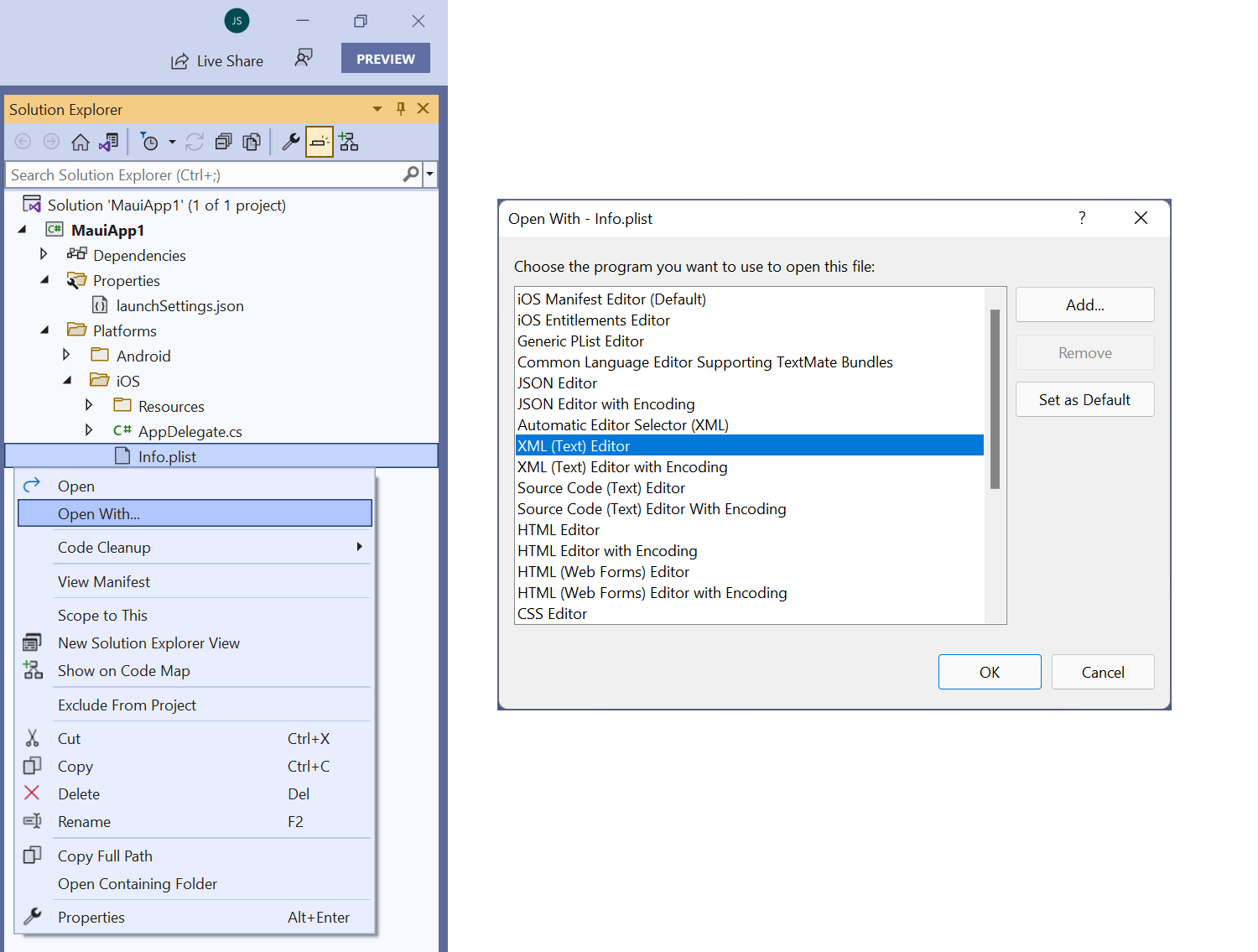
Here's an example configuration for one endpoint shown as XML:
<key>NSAppTransportSecurity</key>
<dict>
   <key>NSExceptionDomains</key>
      <dict>
      <key>dotnet.microsoft.com</key>
      <dict>
        <key>NSExceptionMinimumTLSVersion</key>
        <string>TLSv1.0</string>
        <key>NSExceptionAllowsInsecureHTTPLoads</key>
        <true/>
      </dict>
   </dict>
</dict>
This example adds an exception to the endpoint at dotnet.microsoft.com. If you're debugging a service locally on your development machine, you can opt out of App Transport Security for local traffic with the NSAllowsLocalNetworking key as follows:
<key>NSAppTransportSecurity</key>
<dict>
    <key>NSAllowsLocalNetworking</key>
    <true/>
</dict>
If you can't identify all your endpoints, disable App Transport Security for all unspecified endpoints by using the NSAllowsArbitraryLoads key:
<key>NSAppTransportSecurity</key>
<dict>
   <key>NSAllowsArbitraryLoads</key>
   <true/>
</dict>
There are other options that you can add to be more specific about how you want to opt out. Further guidance is outside the scope of this module.
Configure Android Network security
Like iOS, Android has a similar security model around network communication. This model was introduced with Android 9 (API level 28). Clear text (non-HTTPS) traffic is disabled by default when your application targets Android 9 (API Level 28) or higher. This policy might affect your development cycle if your app needs to download an image or file on a server that hasn’t been configured for HTTPS. Also, you might just be trying to debug your application locally and don’t want to install development certificates. You might have strong business requirements that all web traffic on all versions of Android is always HTTPS. The Network Security Configuration feature of Android allows you to finely tune network traffic security in an app.
Permit clear text traffic
To permit clear text traffic, create a new XML file in the Resources/xml folder named network_security_config.xml (You might also need to create the xml folder). The Resources folder is in the Android platform folder in Solution Explorer. Inside this file, add a network-security-config element with a domain-config child element. The following configuration enables clear text traffic for a specific domain and for an IP address:
<?xml version="1.0" encoding="utf-8"?>
<network-security-config>
  <domain-config cleartextTrafficPermitted="true">
    <domain includeSubdomains="true">10.0.2.2</domain> <!-- Debug port -->
    <domain includeSubdomains="true">microsoft.com</domain>
  </domain-config>
</network-security-config>
You can strengthen your app's security by restricting clear text traffic on all versions of Android regardless of the target framework. You do this by setting the cleartextTrafficPermitted property of the domain-config element to false. This configuration setting blocks all non-HTTPS traffic.
For the app to recognize the network_security_config.xml file, configure the networkSecurityConfig property for the application node in the AndroidManifest.xml located in the Properties folder:
<?xml version="1.0" encoding="utf-8"?>
<manifest>
    <application android:networkSecurityConfig="@xml/network_security_config" ...></application>
</manifest>
You can specify additional options if you need to be more specific about how you want to opt out of transport security.
Debug apps locally
An important benefit of building mobile applications with Visual Studio is the ability to run and debug mobile applications using the iOS Simulator or Android emulator. These apps can consume ASP.NET Core web services that are running locally and exposed over HTTP.
Applications running in the iOS Simulator can connect to local HTTP web services using your machine's IP address, or via the localhost hostname. The application must opt out of ATS specifying a minimum of NSAllowsLocalNetworking. For example, given a local HTTP web service that exposes a GET operation via the /api/todoitems/ relative URI, an application running in the iOS Simulator can consume the operation by sending a GET request to http://localhost:<port>/api/todoitems/.
Applications running in the Android emulator can connect to local HTTP web services through the 10.0.2.2 address. This address is an alias for the host loopback interface (127.0.0.1 on your development machine). A network-security configuration must also be set up for this specific IP address. For example, given a local HTTP web service that exposes a GET operation via the /api/todoitems/ relative URI, an application running in the Android emulator can consume the operation by sending a GET request to http://10.0.2.2:/api/todoitems/.
Note
ASP.NET Core web services running under test on the local host must disable HTTPS redirects by commenting out the statement app.UseHttpsRedirection(); in the Startup.cs file.
Detect the operating system
An app can determine on which platform it's running by using the DeviceInfo class. In the following example, the application sets the BaseAddress variable to a different value, depending on whether it's running on Android:
public static string BaseAddress = DeviceInfo.Platform == DevicePlatform.Android ? "http://10.0.2.2:5000" : "http://localhost:5000";
public static string TodoItemsUrl = $"{BaseAddress}/api/todoitems/";