Extension Types
Every Wisej.NET extension is one of five kinds. The kind decides which Wisej.NET base class the extension derives from, whether it has a JavaScript side, and how it appears in the Visual Studio designer. Knowing the kind of an extension tells you how it behaves before you read its page. It's also the first decision to make when you write an extension of your own.
| Kind | Derives from | Client side | In the designer | Examples |
|---|---|---|---|---|
| Control | Control or a subclass | Optional JavaScript class of its own | A control you drop on a container | JustGage, ProgressCircle, NavigationBar |
| Widget | Widget | A third-party JavaScript library, loaded as packages | A control you drop on a container | CoolClock, jQueryKnob |
| Component | System.ComponentModel.Component or Wisej.Base.Component | None, or a non-visual JavaScript object | The component tray | Translation, Geolocation |
| Extender provider | Wisej.Web.Component + IExtenderProvider | Whatever the extender adds to other controls | The component tray; adds properties to the other controls | Bubbles, Speech |
| Icon pack | — (an assembly of embedded images) | None | The image picker | FontAwesome, MaterialDesign |
Naming convention
The assembly name, the namespace and the NuGet package all follow the same pattern:
| Pattern | Used for | Example assembly | Example package |
|---|---|---|---|
Wisej.Web.Ext.{Name} | Extensions tied to Wisej.Web controls: controls, widgets and extender providers | Wisej.Web.Ext.ChartJS | Wisej-4-ChartJS |
Wisej.Ext.{Name} | Extensions not tied to a control: services, device APIs, file systems, icon packs | Wisej.Ext.Geolocation | Wisej-4-Geolocation |
The 4 in Wisej-4-* is the Wisej.NET major version. Packages named Wisej-3-* and Wisej-2-* are for the older releases and don't work with Wisej.NET 4. See Installing an extension.
Control
A Wisej.NET control has two halves: a server class derived from Wisej.Web.Control (or one of its subclasses) and a JavaScript class that renders it in the browser. Framework controls such as TextBox work the same way. The JavaScript half is optional for an extension, which gives two flavors:
- Built on an existing control, with no JavaScript of its own. ProgressCircle derives from
Canvasand draws itself with HTML5 canvas calls issued from the server. It's easy to write, but it can only do what its base class can do on the client. - With a JavaScript class of its own. JustGage derives from
Control, implementsIWisejControland shipswisej.web.ext.JustGage.js, a client class that wraps the JustGage and Raphaël libraries. Anything the browser can do, the control can do, and it's all driven from the server.
NavigationBar shows a third approach: a composite control assembled from existing Wisej.NET panels, with a theme mixin for its look.
Start without a JavaScript class and add one only when the base class really stops you. A control built only on server-side code has no client code to keep in step with the server, and it keeps working when Wisej.NET updates its client library.
Widget
A widget derives from Wisej.Web.Widget, the general-purpose host for third-party JavaScript libraries. It doesn't provide a JavaScript class. Instead, it tells Widget what to load and how to start it:
Packageslists the JavaScript and CSS files to load, in order. Packages are cached by name, so a library that several widgets use (jQuery, say) is loaded only once per page.InitScriptis the JavaScript that creates the third-party widget once the packages are loaded.
This is what jQueryKnob does. It embeds its libraries in the assembly and serves them with GetResourceURL:
public override List<Package> Packages
{
    get
    {
        if (base.Packages.Count == 0)
        {
            base.Packages.Add(new Package()
            {
                Name = "jquery.js",
                Source = GetResourceURL("Wisej.Web.Ext.jQueryKnob.JavaScript.jquery-3.1.1.js")
            });
            base.Packages.Add(new Package()
            {
                Name = "jqueryknob.js",
                Source = GetResourceURL("Wisej.Web.Ext.jQueryKnob.JavaScript.jquery.knob.js")
            });
        }
        return base.Packages;
    }
}
Widget isn't only a base class. You can drop it on a page as it is and fill in Packages and InitScript in the designer to try out a library before you wrap it. See Widget and Extend Widgets in the user guide.
Serve third-party files from the assembly's embedded resources, as jQueryKnob and CoolClock do, rather than from a public CDN. The application then works offline and behind firewalls, and a CDN outage or a silent library update can't break it.
Component
A component has no user interface of its own. It sits in the designer's component tray and gives the application a service. There are two flavors:
- Server only. Translation derives from
System.ComponentModel.Componentand never talks to the browser. It calls a translation service from the server and returns the result. - Server and client. Geolocation derives from
Wisej.Base.Componentand ships a JavaScript class that is a plain client-side object, not a widget. It calls the browser's geolocation API and returns the result to the server asynchronously, so a server method canawaita value that only the browser knows.
Extender provider
An extender provider adds properties to other controls. It implements System.ComponentModel.IExtenderProvider and derives from Wisej.Web.Component. Drop one on a page and every control on the page gets new properties in the property grid.
- Bubbles (
BubbleNotification) adds a notification bubble to any control. - Speech (
SpeechRecognitionandSpeechSynthesis) adds speech input and output to controls.
The framework uses the same mechanism for ToolTip, ErrorProvider, Animation and JavaScript, among others. An extender that also implements IWisejExtenderProvider can change the controls it extends in the designer: Rotation and StyleSheet render their effect at design time as well as at runtime. See Extenders in the user guide.
Icon pack
An icon pack is an assembly of SVG, PNG or GIF images embedded as resources, usually with a static class that exposes every icon name as a string constant. Reference the package, and Wisej.NET finds the pack and lists it in the designer's image picker next to your own images and the theme's icons:
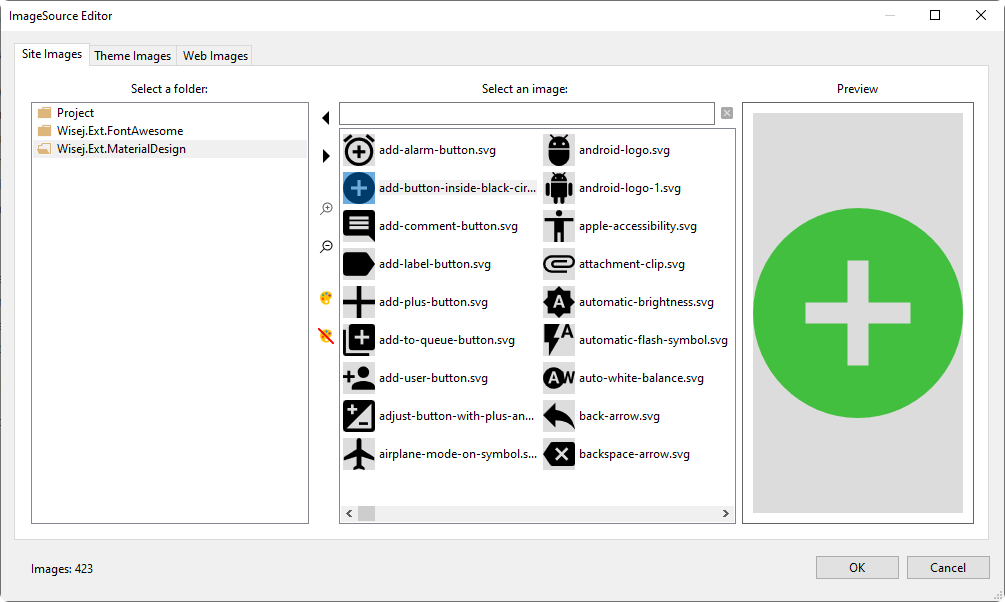
See Icon Packs for the available packs and how to use their icons in code.
Writing your own
The standard extensions are open source on GitHub. They're the best starting point for your own: pick one of the kind you need, copy its project and adapt it. A few things every extension project has:
[assembly: WisejResources](WisejResourcesAttribute) inAssemblyInfo.cs. It tells Wisej.NET to serve the assembly's embedded JavaScript, CSS and theme files and to load its*.mixin.themefiles automatically. See Embedded Resources.- Embedded resources for every client file (
<EmbeddedResource Include="..." />in the.csproj). - A toolbox bitmap (
[ToolboxBitmap]) and a designer attribute, so the extension shows up properly in Visual Studio. - The same target frameworks as Wisej.NET, .NET Framework 4.8 and .NET 8 or later, so it works in every project type.
If you improve an extension in a way that others could use, open a pull request or an issue on the wisej-extensions repository.