DevExpress DevExtreme
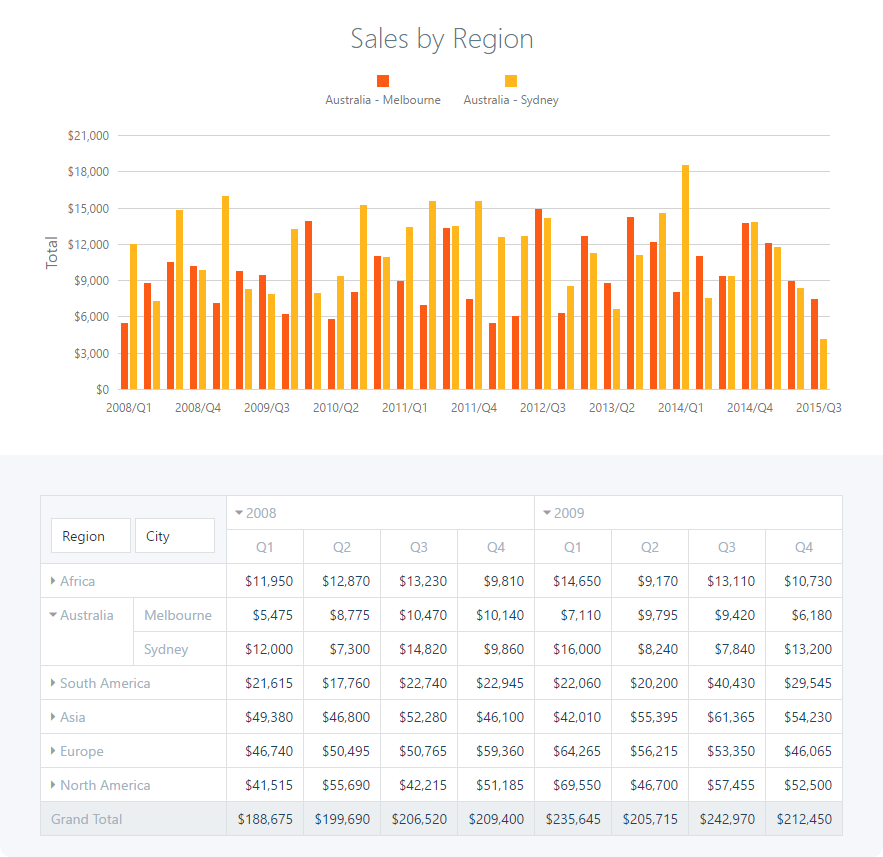
DevExtreme is DevExpress's JavaScript component suite: a feature-complete data grid and pivot grid, charts and gauges, scheduler, Gantt, diagram, HTML editor, file manager and a full set of editors. The Wisej.Web.Ext.DevExtreme extension wraps 38 of them as Wisej.NET controls that you place in the designer and drive from C# or VB.NET.
Installation
dotnet add package Wisej-4-DevExtreme
The package targets .NET Framework 4.8 and .NET 8 or later. After a rebuild, the dx* widgets appear in the Visual Studio toolbox.
DevExtreme is a commercial product of DevExpress, and using it requires a DevExtreme licence bought from DevExpress. That's separate from your Wisej.NET licence, which must also include the premium extensions. Recent DevExtreme versions also check a licence key in the browser. Set it in the configuration file:
{
  "source": "cdn",
  "theme": "material.blue.light",
  "licenseKey": "YOUR-DEVEXTREME-LICENSE-KEY",
  ...
}
By default the scripts come from the DevExpress CDN, version 22.2.4, together with jQuery 3.6 and JSZip for exports. To use a newer DevExtreme release, or to serve the files yourself, override Wisej.Web.Ext.DevExtreme.json as described in Configuration. The class names and options follow DevExtreme's own API, so a newer version generally works with the same wrappers, but check the DevExtreme breaking-change notes for the widgets you use.
How the wrapper works
Every widget derives from dxBase, which derives from the Wisej.NET Widget. Each class names the DevExtreme component it creates, and has the same name. dxDataGrid creates a dxDataGrid, dxScheduler a dxScheduler, and so on. As a result, the DevExtreme API reference is also the reference for these classes:
| DevExtreme reference section | In Wisej.NET |
|---|---|
| Configuration (options) | The dynamic Options property |
| Methods | Calls through the dynamic Instance property, plus an …Async version of each |
Events (onXxx options) | Instance.onXxx += in C#, AddListener("xxx", …) in VB.NET, or the WidgetEvent event. See Events. |
Getting started
This example fills a data grid, selects rows with checkboxes, and reacts to a click on a row on the server.
- C#
- VB.NET
using Wisej.Web.Ext.DevExtreme;

var grid = new dxDataGrid { Dock = DockStyle.Fill };

grid.Options = new
{
    keyExpr = "id",
    dataSource = new[] {
        new { id = 1, customer = "Alfreds Futterkiste", country = "Germany", total = 814.50 },
        new { id = 2, customer = "Ana Trujillo",        country = "Mexico",  total = 88.80 },
        new { id = 3, customer = "Around the Horn",     country = "UK",      total = 480.00 }
    },
    columns = new object[] {
        "customer",
        "country",
        new { dataField = "total", format = "currency" }
    },
    selection = new { mode = "multiple", showCheckBoxesMode = "always" },
    paging = new { pageSize = 20 }
};

// https://js.devexpress.com/Documentation/ApiReference/UI_Components/dxDataGrid/Configuration/#onRowClick
grid.Instance.onRowClick += new WidgetEventHandler((s, e) =>
{
    AlertBox.Show("Clicked " + e.Data.data.customer);
});

this.Controls.Add(grid);

// Later: read the selection back from the browser.
var keys = await grid.Instance.getSelectedRowKeysAsync();
Option Strict Off
Imports Wisej.Web.Ext.DevExtreme

Dim grid As New dxDataGrid With {.Dock = DockStyle.Fill}

grid.Options = New With {
    .keyExpr = "id",
    .dataSource = {
        New With {.id = 1, .customer = "Alfreds Futterkiste", .country = "Germany", .total = 814.5},
        New With {.id = 2, .customer = "Ana Trujillo", .country = "Mexico", .total = 88.8},
        New With {.id = 3, .customer = "Around the Horn", .country = "UK", .total = 480.0}
    },
    .columns = New Object() {
        "customer",
        "country",
        New With {.dataField = "total", .format = "currency"}
    },
    .selection = New With {.mode = "multiple", .showCheckBoxesMode = "always"},
    .paging = New With {.pageSize = 20}
}

grid.AddListener("rowClick", AddressOf Grid_RowClick)
Me.Controls.Add(grid)

Private Sub Grid_RowClick(sender As Object, e As WidgetEventArgs)
    AlertBox.Show("Clicked " & e.Data.data.customer)
End Sub
The Options property in the Visual Studio property grid accepts JSON. You can copy the configuration object of any DevExtreme demo, convert it to JSON by quoting the keys and removing functions, and paste it in.
Everything in Options is serialized and sent to the browser, dataSource included. For a few thousand rows that's fine. For large tables, page the data yourself, or point dataSource at a web API, for example through the bundled DevExpress.data.AspNet loader, instead of sending the whole table.
Widgets
| Area | Classes |
|---|---|
| Data | dxDataGrid, dxTreeList, dxPivotGrid, dxFilterBuilder, dxList, dxTreeView, dxTileView, dxGallery |
| Charts and gauges | dxChart, dxPieChart, dxPolarChart, dxFunnel, dxSanKey, dxTreeMap, dxSparkline, dxBullet, dxRangeSelector, dxCircularGauge, dxLinearGauge |
| Scheduling and planning | dxScheduler, dxGantt, dxCalendar, dxKanban |
| Editors | dxForm, dxDateBox, dxColorBox, dxLookup, dxSwitch, dxRangeSlider, dxHtmlEditor |
| Navigation and actions | dxMenu, dxNavBar, dxDropDownButton, dxSpeedDialAction, dxProgressBar |
| Other | dxDiagram, dxFileManager, dxMap |
Classes with extra members
Most classes add nothing beyond the constructor. These add typed .NET members:
| Class | Extra members |
|---|---|
dxHtmlEditor | Text and HtmlText, synchronized with the editor's content, so you can bind and read it like any Wisej.NET text control. |
dxKanban | A Kanban board built on DevExtreme's dxSortable (DevExtreme has no Kanban component of its own). It has a typed model: Groups (a collection of dxKanban.Group, each with ID, GroupName and Items), items of type dxKanban.Item (ID, Title, Description, Color), ItemOrientation, ScrollViewDirection, BeginUpdate()/EndUpdate(), and the .NET events ItemClick, ItemDoubleClick, ItemRightClick and ItemDragEnd. |
- C#
- VB.NET
var todo = new dxKanban.Group { ID = "todo", GroupName = "To do" };
todo.Items.Add(new dxKanban.Item { ID = "1", Title = "Write specs", Color = Color.SteelBlue });

var done = new dxKanban.Group { ID = "done", GroupName = "Done" };

this.dxKanban1.BeginUpdate();
this.dxKanban1.Groups.AddRange(new[] { todo, done });
this.dxKanban1.EndUpdate();

this.dxKanban1.ItemDragEnd += (s, e) =>
    AlertBox.Show($"{e.Item.Title}: {e.FromGroup.GroupName} → {e.ToGroup.GroupName}");
Dim todo As New dxKanban.Group With {.ID = "todo", .GroupName = "To do"}
todo.Items.Add(New dxKanban.Item With {.ID = "1", .Title = "Write specs", .Color = Color.SteelBlue})

Dim done As New dxKanban.Group With {.ID = "done", .GroupName = "Done"}

Me.DxKanban1.BeginUpdate()
Me.DxKanban1.Groups.AddRange({todo, done})
Me.DxKanban1.EndUpdate()

AddHandler Me.DxKanban1.ItemDragEnd,
    Sub(s, e) AlertBox.Show($"{e.Item.Title}: {e.FromGroup.GroupName} → {e.ToGroup.GroupName}")
Toast notifications
dxBase.Notify(message, type, displayTime) shows a DevExtreme toast in the browser, through DevExpress.ui.notify. type is one of DevExtreme's toast types ("info", "success", "warning", "error"), and displayTime is in milliseconds (default 500).
dxBase.Notify("Order saved", "success", 2000);
Themes and localization
dxBase.Theme selects the DevExtreme theme for the session: the value becomes the dx.<theme>.css file name, such as material.blue.light, generic.dark or fluent.blue.light. dxBase.Culture selects the language of the built-in messages: it loads dx.messages.<language>.js. See Themes and Localization.
dxBase.Theme = "generic.dark";
dxBase.Culture = new CultureInfo("de-DE");
Resources
- DevExtreme documentation
- API reference: UI components
- Demos
- Premium extensions overview: options, methods, events and widget functions
- Configuration: versions, sources, licence key, themes
Widgetin the Wisej.NET API